Dec 30, 2010

FeyAccelerator – Accelerator for Your Torrents


FeyAccelerator is a p2p tool anyone can use to increase the download speed of their file sharing client. Not at all needy when it comes to using resources from your system it manages in return to render an overall improved p2p experience. Enhance the speed of your torrents using FeyAccelerator.

The support it offers to BitTorrent clients covers all major file sharing programs including: uTorrent, Azureus, Ares, BitComet, LimeWire, Bearshare, BearFlix, BitTorrent, DC++, Emule, Edonkey, FrostWire, Imesh, Kazaa, Morpheus, Shareaza, Warez, WinMx.

With a powerful streaming technology behind it FeyAccelerator pushes the download rate to unprecedented levels by exploiting the full potential of the Internet connection you have and by adjusting bandwidth consumption according to your needs. FeyAccelerator can be regarded as an intermediary between your Internetconnection and your BitTorrent file sharing client able to squeeze and join together what both can best have to offer.

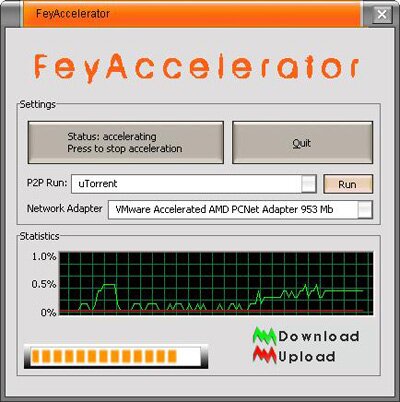
After installing FeyAccelerator, you no longer have to make any configuration – the program does that automatically. It integrates into your native p2p client (make sure you have running) and starts boosting its performance right away displaying at the same time all the information about your torrent downloading you might want to monitor.

FeyAccelerator is easy to use and comes with a simple, newbie-proof interface.

Picture Resize Genius 2.9.368


icture Resize Genius includes the ability to batch resize pictures, batch resize photos, and perform batch image resize functions. Besides, it can add a text overlay (watermark), rename file and more. You will be able to process thousands of files in a few seconds.

New Ashampoo Burning Studio 10


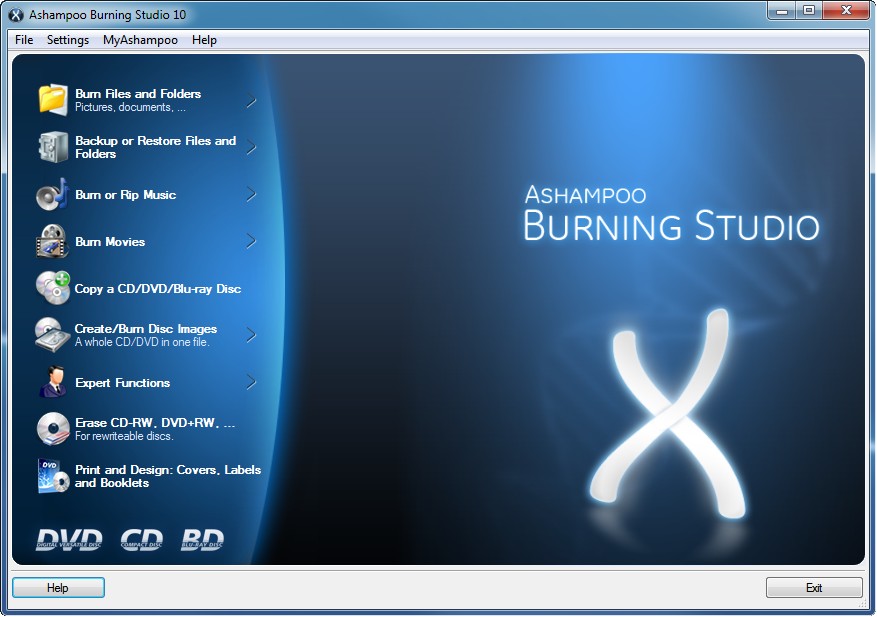
Ashampoo Burning Studio 10 is the all-round tool for all CD, DVD and Blu-ray disc burning tasks. The main focus of this faster, more powerful premium version is even better authoring capabilities for building video and audio discs using the latest formats. HD and Full HD video are now fully supported for Blu-ray discs, and all the encoding is handled by Ashampoo Burning Studio 10. The new integrated editor creates DVD and Blu-ray video discs with automatically generated or self designed menus. Each menu page can use a different theme and background music. The new Autoplay Editor enables the user to build data discs with interactive, multi-page menus that start automatically. The menus for example include links to files or web pages. It is also possible to create auto-starting discs without menus.

Audio files and audio CDs are played directly from within Ashampoo Burning Studio 10. This is very useful when building audio discs, in order to check tracks quickly without switching programs. The audio player has a graphical display with all the standard player controls.

Highlights:

-One tool for all your CD, DVD and Blu-ray burning tasks

-Advanced audio and video disc authoring tools

-Completely redesigned DVD and Blu-ray video disc editor

-All authoring tools overhauled and improved

-Create HD and Full HD Blu-ray video discs (720p and 1080p)

-Autoplay Editor for building auto-starting data discs with menus

-Integrated Audio Player – play audio tracks and CDs directly

-New and improved themes for DVD and Blu-ray menus

-Burn all kinds of data, music, video and photo discs

-Copy discs, backup and restore your data

-Rip music to a variety of formats

-Update existing discs, add new data and content

-Create and burn disc images and bootable discs

Ashampoo Burning Studio 10 in a nutshell:

Version: 10.0.1

Software: Shareware

Platform: Win XP, Win Vista™, Windows 7

Size: 75,04 MB

Language: German, English, Dutch, French, Hungarian, Russian, Polish, Italian, Spanish, Swedish, Czech, Chinese (simplified), Bulgarian, Serbian, Portuguese (Brazilian), Hebrew, Arabic, Dansk, Greek, Slovakian, Armenian, Byelorussian, Persian, Kazakhstan

ashampoo burning studio 10 300x211 New Ashampoo Burning Studio 10

Download Ashampoo Burning Studio 10 here!

Status-4-Evar – Get the ‘Status Bar’ Back in Firefox 4.0

That status bar was removed in Firefox 4.0.

“Status-4-Evar” is a great extension for Mozilla Firefox 4.0 created by “Sparky Bluefang“. Actually this extension is a collection of toolbar widgets that provides replacement for what was previously shown in the statusbar.

This is a collection toolbar widgets that provide replacements for what was previously in the status bar.

After installing the extension, you can customize your toolbars and drag the “Status Text“, “Progress Meter“, and “Download Status” items wherever you want. Behavior of the items can be controlled in the extension preferences.

Works with Firefox 4.0 Beta

Collectorz.com Music Collector 9.2.4


Catalog your CD collection automatically, no typing needed. Just insert a CD in your CD-ROM drive, scan its barcode or type artist and title to download all data from the internet (Collectorz.com and Amazon), including artist, title, year, label, track titles and the cover image. Browse your collection by artist, title, year, etc... or use the Image View to browse your cover images. Export your list to your iPod and take it with you to the store.

Changes in version 9.2.4:
Improved search features, save filters, save columns and sort field definitions, improved support for classical music, easier add wizard, etc...

Zone Alarm Internet Security Suite – Solid Performance at a Reasonable Price

While reviews coming from various web sites as well as computer magazines give mixed verdicts on Zone Alarm’s performance, a very innovative form of protection has been perfected by the makers of the software. The feature is called virtualization and this allows malware and threats to attack your computer. With virtualization, threats and malware are fooled that they have successfully penetrated a real computer. The virtual machine runs with Zone Alarm is able to isolate threats from the real computer and although still a new feature, has very promising signs of effectivity.

zass 2010 1 Zone Alarm Internet Security Suite – Solid Performance at a Reasonable PriceLike most security suites. Zone Alarm excels in detecting viruses and other malware as long as they have been assigned signatures. Signatures reside in the definition database and are one of the data that is downloaded by the software when it is updated. When it is time to scan the computer, either because such scan was scheduled or it was manually enabled, results of file scan are compared to the signatures present in the database. What other brands of security suites excel in doing, but not Zone Alarm Internet Security Suite, is the ability to detect new forms of threats and viruses that do not signatures assigned to them. Such form of detection is called heuristic scanning and is based on rules of thumbs on how viruses behave. This is what some experts call a major weakness of Zone Alarm and other security software as well. But with virtualization, Zone Alarm’s lack of sophisticated heuristic scanning could be more than mitigated.
A relatively new form of threat that has received much study is the rootkit. When rootkits are embedded in malware, it enables the creator of the malicious software to have full control of the computer and everything inside the computer is not safe, including data. What is creepy about rootkits is that most users will not be aware that their computer has been compromised and they can go on computing happily not knowing that data, perhaps personal finances or important office documents, are wide open to prying eyes.

Teaming up with virtualization, Zone Alarm’s firewall is another layer of protection for the computer and the data it contains. With the firewall, a user can setup zones of varying levels of security. In a trusted setting of office networks, the firewall can be lowered to allow unhampered connection with other computers. Out in the open, for example in public wi-fi areas, the firewall can be set to high levels of security which could effectively isolate the computer from threats.

Zone Alarm performance when it does its task like after boot-up scanning and on demand file scans is very satisfactory. Its user interface is easy to use and encourages users to explore it s more advanced features. Expert users have access to Zone Alarm’s configurations via advanced menus. When enabled, Zone Alarm Internet Security Suite demands little from the operating system.

Overall, most reviews of Zone Alarm Internet Security Suite state its more than adequate performance in protecting the computer. It is easy to use and have advance features that really enhances its use in securing the computer from the malware and viruses that emanate from the internet.

Wondershare Disk Manager – Free and handy Disk and Partition Manager


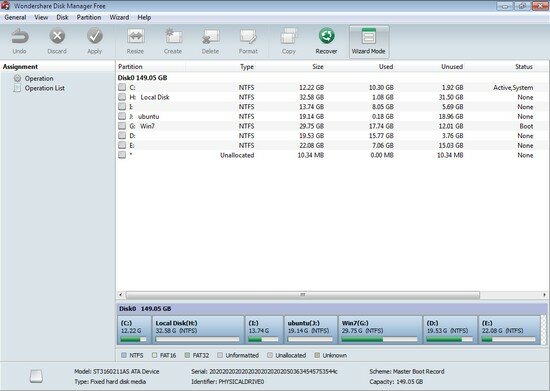
Wondershare Disk Manager is a handy tool for both beginners and experts to copy hard disk and manage partitions. With its complete wizards, you will never make mistake when you need to copy disk/partition, create partitions, resize partitions, delete partitions and recover partitions. Now use Wondershare Disk Manager to reasonably allocate disk space and re-structure your hard disk for maximum use!

Here are some key features of “Wondershare Disk Manager Free”:

Most Handy Partition Manager Ever:
· A full set of disk partitioning features lets you take full control of your hard drive. Need to copy, resize, extend, delete, merge, split orrecover partitions but fear to lose important data? With this handy and safe partition manager, you can Do It Yourself.

· Create Partition: create a new partition or re-partition your hard drive for better usage.
· Delete Partition: delete a partition or delete all partitions. You can choose whether to shred data in the partition.
· Resize Partition: extend a partition to a larger size or reduce a partition without losing data.
· Copy Partition: copy a partition as well as all files in it for backup. You can save the copy to another partition or another storage device.
· Recover Partition: recover lost partitions as well as files in it from misoperation, software/hardware failure, or virus attack.
· Convert Partition: convert FAT to NTFS or vice versa.
· Set Partition Active: your computer will boot from the active partition.
· Hide/unhide Partition: make your sensitive partition invisible and prevent unauthorized access.
· Format Partition: prepare for installing OS or re-organizing your hard disk.

Disk Copy & Management:
· Disk Management allows you to copy hard disk for backup or upgrading to a new hard drive, and delete all partitions in one time.
· Copy Disk: create an exact disk copy for backup or upgrading to a new hard drive.
· Delete All Partitions: delete all partition in one time quickly.

Complete Wizards for Multiple Partitioning Tasks:
· Five intelligent partition wizards (resize partition wizard, create partition wizard, delete partition wizard, copy partition wizard and recover partition wizard) included in Wondershare Disk Manager help you complete multiple partitioning operations in a breeze.